
Prompt Engineering | Bridging AI & 3D Software

Updated: Oct 6, 2024
When it comes to prompt engineering, the goal is simple: we want to produce an image that’s both accurate to our vision and easily translated into our choice of creative software.
To do that, using specific and familiar terms is crucial.
For this example we will be incorporating typical 3D software and lighting terms like "Voronoi Pattern" and "Key Light"— terms with clear counterparts in your 3D software.
Terms you can use to achieve a result that not only accurately reflects your vision but also allows you to recreate said image in programs like Cinema4D.

Tutorial: Crafting the Perfect Prompt
Let’s dive into a practical example of how to engineer an effective prompt.
I will be using MidJourney in this example but you can use whatever Ai Text to Image generator you like.
I believe if you use this exact prompt it will yield pretty similar results.
Prompt:
A centered gold ball rests on a Roman pillar, positioned in front of a red felt curtain. A key light casts shadows through a Venetian blind gobo onto the black marble floor, which is fragmented with Voronoi pattern cracks. The scene is captured with a 55mm lens for optimal framing.
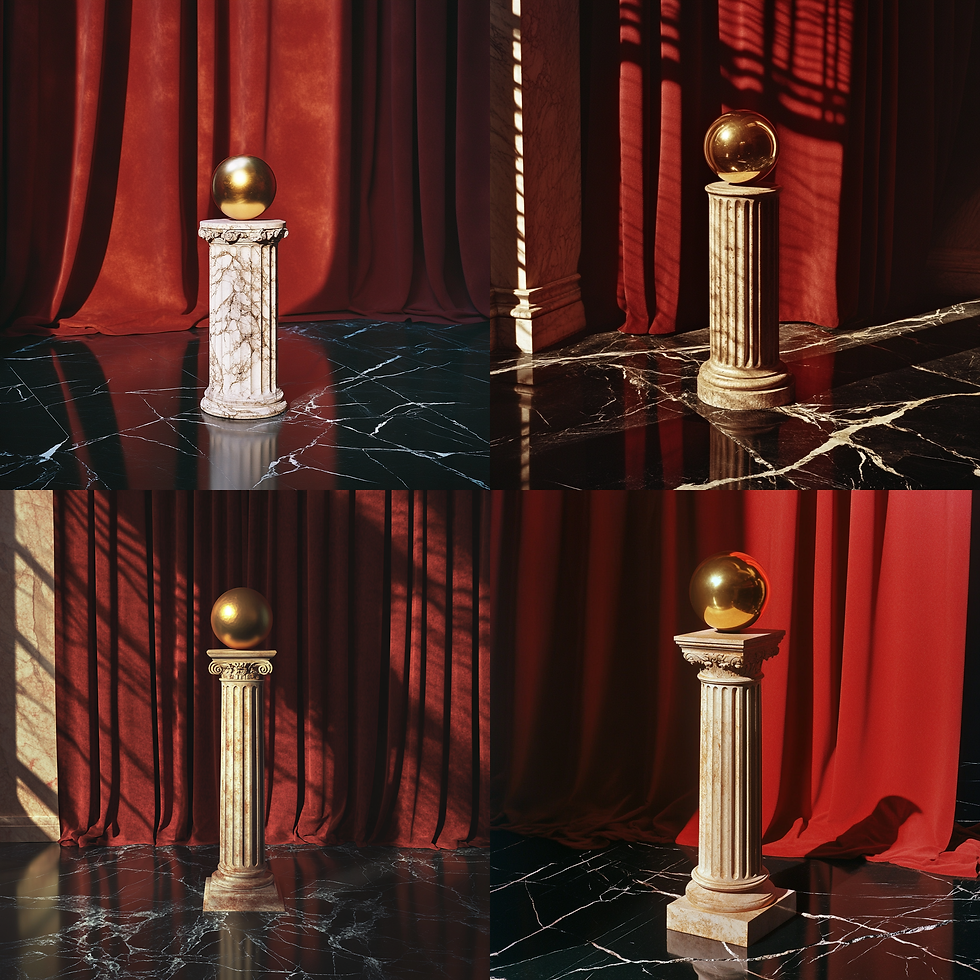
Why This Prompt Works
Specific and Easily sourced terms for 3D Models: The Roman pillar is straightforward to model and or easily sourced.
Defined Lighting Setup: A “key light” specifies a well-known lighting setup that’s easy to replicate and has a fairly standard positioning.
Textures and Patterns: Voronoi for the floor is a noise pattern often used in 3D software, ensuring your prompt results match your software capabilities.
Positioning and Lenses: A 55mm lens is considered standard and closely mimics human vision in terms of optics. Referring to the scene as "centered" helps us place the pillar and the ball in the frame effectively.
Prompt: Top down realistic honeycomb Vs. Prompt: Top down Voronoi pattern honeycomb

Detailed vs. General Prompts
You may notice that when you give a prompt this specific, the results tend to look consistent but not necessarily impressive. A more generalized prompt, such as:
Prompt:
Create a stunning 3D scene featuring a gold ball perched on a Roman pillar. The render should be of high quality, using Octane render.

This allows the AI more freedom, often producing more creative results. The paradox here is that being overly descriptive can sometimes limit AI’s potential for creativity.
I mention this because it is important to leverage the "slot-machine" nature of Ai depending on what the deliverable is.
However, when working with the intent of creating a specific image or ideating and eventually replicating the scene in 3D, the aim is precision and control.
By using prompts that mirror the language of 3D software, you can ideate more easily and bridge your creative vision from AI to your 3D rendering tool.
Here are some examples of a scene based on this prompt I made in Cinema4D


From an ideation standpoint, this approach is a game-changer. You can visualize scenes before committing to building them in Cinema4D, allowing you to evaluate concepts early in the process. Once you recreate the scene in Cinema4D, you gain complete control—adjusting lights, moving the camera, and fine-tuning every detail. This level of precision offers creative freedom that AI-generated images alone can't match, giving you the flexibility to perfect your vision.
Another major benefit comes from a video workflow perspective.
Since AI video is still fairly inconsistent, difficult to control—often struggling with animated still lives and getting confused outside of human faces or characters—having a reliable backup is crucial.
Below is an example of our MidJourney outputs animated through RunwayML compared to the scene built in Cinema4D animated.
Even if you're pursuing an entirely AI-generated process from images to video, it's wise to build something in a language you’re comfortable with that leverages your knowledge in Cinema4D or any other creative software.
This ensures you can take over manually if needed, giving you more control over the final result.
Useful Prompt Words for 3D Artists
Here are some terms that can help you maintain control over AI-generated scenes, while also being easily translated to your 3D software:
Camera Directions:
Centered
Isometric
3/4 view
Right/Left Side Angle
55mm, 35mm, 25mm
Lighting:
3-point lighting
Key light
Fill light
Studio Lighting
Venetian Gobo
Tree Leaf Gobo
Soft shadows
Textures/Materials:
Concrete
Oak
Velvet
Marble
Moss
Voronoi, Buya, Naki (Noise)
By leveraging these and similar terms, you can use AI to ideate efficiently, then bring that vision to life in 3D with accuracy and control.
By refining prompt engineering with specific terms that map directly to your 3D workflow, you can generate highly accurate visuals during ideation. This approach allows you to visualize scenes before committing to full production, ensuring that what you create with AI can be faithfully recreated and refined in Cinema4D.


Comments