
QR Codes Suck | QR Code Monster

Updated: Oct 5, 2024
Let’s face it: QR codes have always sucked. How many times have you crafted a stunning design, only for the client to ask “Can you add this QR code?”
And let’s be honest, the QR code they hand you is usually the size of a postage stamp and has the shelf life of a banana.
You can either take these ugly little codes as they come or go the extra mile to make them look at least somewhat decent and cohesive with your design.
A QR code plopped down in the bottom right corner looks less like a design element and more like an ancient Chinese seal.

Credit: www.art-virtue.com
It honestly feels more like a legal requirement than a design element.
These days if you have any print or digital signage work on your plate; you’ll be hard-pressed to have an approval that lacks this “final touch”
The great seal of the client: the QR code.

Credit: MidJourney (Prompt: Ancient Chinese art work but instead of imperial seals it’s stamped with QR codes)
Now, thanks to QR codes anyone who sees your poster can scan that code and be instantly redirected to a desktop version of a webform for a campaign that is already over.
Or better yet an app that has been removed from the App Store or even a long abandoned Instagram account!
For added fun, thanks to the fly-by-night QR code service your client probably used, they’ll need to pay-up soon. Because that QR code is about to expire, and if it does your client is going to message you in the middle of the night angry because they just printed and mailed 400 reverse mortgage mailers and if the QR code doesn’t work there will be hell to pay.
Has that ever happened to you?
No? Well if it has I have the only website you need to prevent this nightmare, along with some quick questions to ask your client.
First off, when your client hands you a QR code, ask the following:
1. Can I have the direct link?
You’ll want redundancy here. A written-out link (if it’s short enough) can save you from the inevitable data/physical-rot of QR code as well as the fussiness of a phone scan.
2. Is the landing page designed for mobile?
If you’re directing users to a desktop site, there’s no point in including a QR code.
3. Thanks for the QR code; I’m going to redesign it to match the aesthetic.
Don’t give them the option! Don’t ask, “Would it be okay?” Just go for it.
Let's begin, first, take a long, hard look at your design—really stare into the void.
What’s the color palette? Are you going for flat design? Are you rounding every corner like it’s 2016 and “Web 3.0” is still a thing?,
With QR Code Monkey, you can customize the QR code to make it look like you actually put some thought into it.
For example, Take a look at this banner for Just My Doc. Go on, drink it in:

See that? The QR code is clean, with the company logo-mark in the center.
Now, you’re going to hear a lot of talk and come across a bunch of websites offering similar QR code services.
Don’t!
Put it down.
Delete them from your brain, never look for them again. Never google them again.
Bookmark QR Code Monkey.
Here’s why:
Unlimited Scans & Lifetime
Custom Logos
High-Resolution Print Quality
Vector Formats
Customizable Design & Colors
Free for Commercial Use
Alright, let’s dive in:
Step 1:
Paste whatever junky URL your client gave you into the “Enter Content” section. For this example, I’m using my site, robertmuncie.com, because obviously.

Step 2:
Set the color to black. I’m going to download it as an .SVG and make some tweaks in Adobe Illustrator later. You want flexibility here.

Step 3:
Add your logo. I am using the circle variant of my logo.

Side note: Don’t ever put your initials in a circle and call it a logo. Do as I say not as a I do. Besides I only have a circle variant for websites that demand a circle profile picture.
Step 4:
Customize Design. So here you basically have all the control you’d ever want over the “design” of the QR code.
You can change the weird maze pattern to be less or more upsetting.
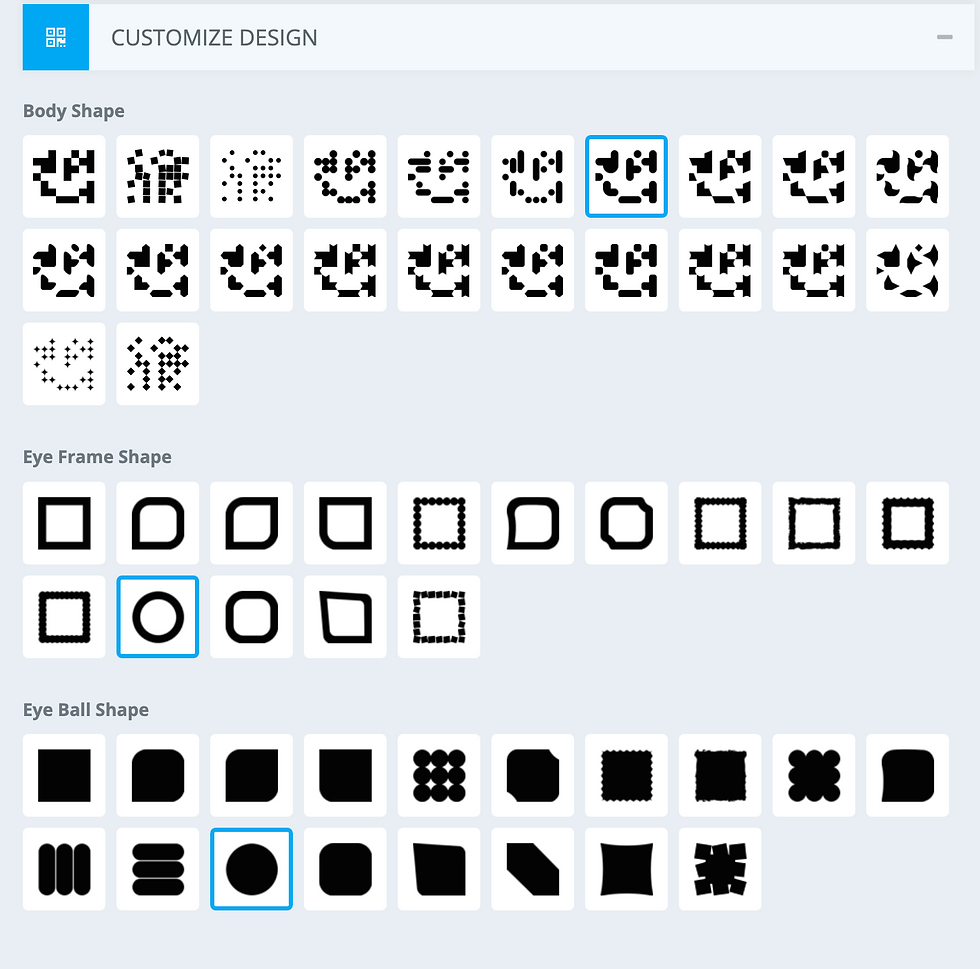
For this example, since my logo is circular, I used all round and circular nonsense maze patterns.

But wait. Let’s say your client isn’t impressed. They hate your QR code. They might even hate you. Why? Because they see you have the capacity to use a simple website and they are hungry for more.
Welcome to Scope Creep

This is where you pull out the big guns: our favorite existential nightmare, artificial intelligence.
Now that you’ve created a perfectly cromulent QR code, why not run it through an AI filter that makes it look like something you’d find on DeviantArt in 2016?
Does it make sense? Absolutely not.
Are you doing it anyway? Of course! Because you went to college for this and you are going to see this career to its logical conclusion.
For this example, we’re going back to our trusty friend from the first post: Illusion Diffusion
Illusion Diffusion uses Monster Labs' QR Control Net, so this use case is a return to form more than anything else.
Bonus tip: You can run Illusion Diffusion locally with Pinokio for a more stable experience, but honestly, the in-browser version works just fine. That being said you will get extra "hacker points" if you use Pinokio.
Step 1: Prepare Your QR Code:
As usual, you’ll need to upload your QR code as a 1:1 image. Unfortunately, the flashy QR code we just made won’t cut it here—you’re going to need a boring, black-and-white one for the best results.

Step 2: Dial in Your Settings
Here are the settings I found that worked best for this particular QR code:

Illusion Strength: 0.825
Guidance Scale: 7.5

It’s a delicate balance, but trust me, these numbers do wonders for minimizing the weird Ai hallucination horrors.
Step 3: The Prompt:
Since this QR code will link to my website, I want something modern and trendy that fits my brand colors and subtly hints at my skillset. You also want to think of something that leans in to the AI aesthetic.
Prompt: Fuzzy Pink and White Monster
And... voila! Well, it's... definitely interesting

Obviously, we’ve got some legibility issues, especially with the left eye. So, here's the fix: hop into Photoshop, layer the original QR code back on top, and start playing around with blur, opacity, and blending modes until your phone can read it.

Then, take the right eye—which came out fine—and use it to clean up ol' lefty over there.
Dare to compare! Which one is your phone looking at?

Ratings are going to be a bit different in this article, since we've tried two different web applications.
First up: QR Code Monkey
Caveats:
It’s a bit paywalled, but I’m really nitpicking here—the free version is great. Behind that paywall are some handy features, though, like saving and returning to projects and downloading in various formats. Given how things are going, maybe throw them a few bucks so we can keep apps like this alive.
Conclusion:
Rating: ★★★★★
Price: Free
Link: QR Code Monkey
Next: Illusion Diffusion
Caveats:
Unfortunately, the same issues that make Illusion Diffusion a bit weak still apply here:
You can’t choose the model or training data, so you’re stuck with whatever flavor of Stable Diffusion they’ve baked in.
Outputs are often just... okay, and the UI can be sluggish.
Future support? Who knows?
Conclusion:
Rating: ★★★★☆
Price: Free
Link: Illusion Diffusion
Post-Script:
Normally, I’d stop at the software review, but I need to address the elephant in the room: AI-generated QR codes. I’m just going to say it—this dog won’t hunt.
I spent a solid hour trying to coax something halfway decent out of this, and frankly, it’s not worth the time. The concept has been floating around for nearly a year, and it's clear it fizzled out for a reason.
It had a brief moment of hype, probably because it brought some level of control to AI workflows, which have largely been a black box. But in the end, this fad was DOA—there’s just no real interest from brands.


Comments